Ryzen PC Builder Under 40K - Development, Office and Budget Gaming
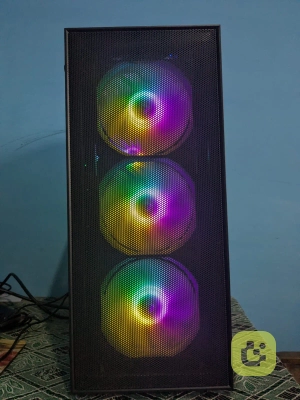
Explore our Ryzen 5 5600GT PC build under ₹40,000 with 16GB RAM, NVMe SSD and integrated graphics. See the components, pricing and real-world performance.
Ryzen 5 5600GT Budget PC Build Review – Our ₹35,800 PC Build Experience
We wanted to build a reasonably powerful PC without spending too much, mainly for development, Docker, Spring Boot microservices testing, office work and some budget gaming.
So we built this PC with the Ryzen 5 5600GT as the main processor. When we purchased all the components, the total cost came to around ₹36K - ₹38K.
One important thing to mention before going through the build: these are the prices we paid when we purchased the components. Some of the prices have increased now, so don't consider ₹35,800 as the current build price. We are mentioning our original purchase prices to show what we actually paid.
Note: This was the price when we built the PC in February 2026. However, the price has since increased by almost 10×.
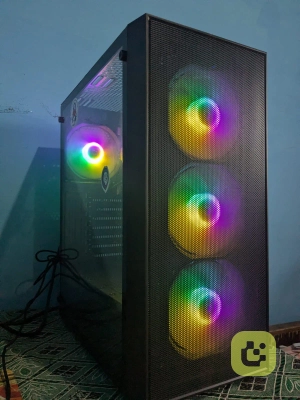
Our complete build
So for around ₹35.8K at the time we bought it, we got the complete setup including the monitor.
Ryzen 5 5600GT – The main reason we built this PC
We selected the Ryzen 5 5600GT mainly because we didn't want to spend money on a dedicated GPU immediately.
For our usage, the processor is performing really well.
We are using this PC for software development, Docker and testing Spring Boot microservices, and the performance is more than enough for these workloads
We can run our IDE, browser, Docker containers and development tools together without feeling that the processor is struggling.
For someone building a budget development PC, we feel this processor makes a lot of sense because you get integrated graphics and can add a dedicated GPU later.
We purchased it for around ₹11,700, although the price has increased slightly now.
What about gaming?
The integrated graphics are also capable of some budget gaming.
For lighter games and less demanding titles, you can use the integrated graphics without buying a separate GPU.
But if you're expecting to play modern demanding games at good settings, then you will definitely need a dedicated graphics card.
For us, the integrated graphics are more useful because they allow us to build the PC now and add a GPU later if we need it.
The processor also comes with a stock cooler, and for our development and normal usage, the stock cooler is doing the job well enough. We didn't feel the need to spend extra money on a CPU cooler.
MSI A520M-A PRO motherboard
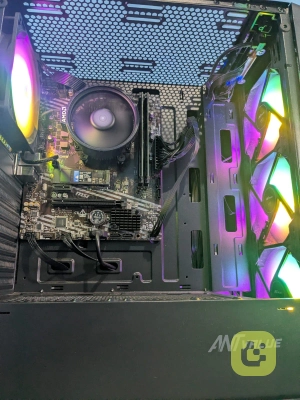
We went with the MSI A520M-A PRO without Wi-Fi, which cost us around ₹4,600.
For a budget build like this, it is a fairly straightforward motherboard and gives us what we need for the current configuration.
One thing to remember is that this particular version doesn't come with built-in Wi-Fi, so if you need wireless connectivity, you'll have to use a Wi-Fi adapter or another solution.
For us, that wasn't a big issue because we can use a wired network connection.
At this budget, we were mainly looking for something reliable enough to support the 5600GT and our other components without unnecessarily increasing the build cost.
512GB WD Blue NVMe SSD
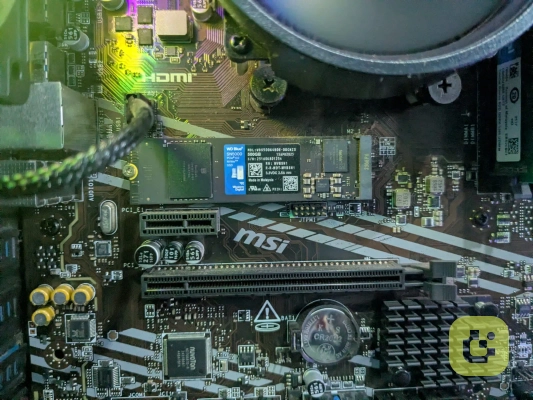
For storage, we went with a 512GB WD Blue NVMe SSD, which we bought for around ₹3,600.
For development work, having an NVMe SSD makes a noticeable difference.
Windows boots quickly, applications open quickly, and our development tools and projects load without much waiting.
For our current usage, 512GB is manageable, but if you're planning to keep a lot of games, videos or large development projects locally, we would suggest going for 1TB if your budget allows.
For a budget development PC, though, 512GB is a good starting point.
16GB Crucial RAM
We used two 8GB Crucial RAM sticks, so we have 16GB RAM in total.
This is one component we would definitely recommend doing properly if you're building a PC for development.
With our usage, 16GB is working well for running the IDE, browser, Docker containers and other applications together.
The two-stick configuration also makes sense for this type of system rather than using only one 16GB stick, especially when you're relying on the processor's integrated graphics.
For our current workloads, 16GB has been enough.
If you're planning to run very large workloads, multiple virtual machines or a lot of heavy containers at the same time, then you may eventually want to move to 32GB.
Coolermaster 450W Bronze SMPS
We used a Coolermaster 450W Bronze-rated SMPS, which cost us around ₹3,000.
For our current configuration without a dedicated GPU, 450W is more than enough for our requirements.
The important thing here is that if you later decide to add a dedicated graphics card, you should check the GPU's power requirements and make sure the power supply is appropriate for that configuration.
For the PC as we built it, we haven't had any issue with the power supply.
Ant Esports CV100 Cabinet
For the cabinet, we went with the Ant Esports CV100, which cost us around ₹2,600.
At this price, we weren't expecting a premium cabinet, but it does the basic job properly.
The components fit inside properly and the overall build looks clean enough.
For a budget PC, we felt it was a reasonable place to save some money rather than spending a large portion of the budget on the cabinet.
LG 22-inch Monitor
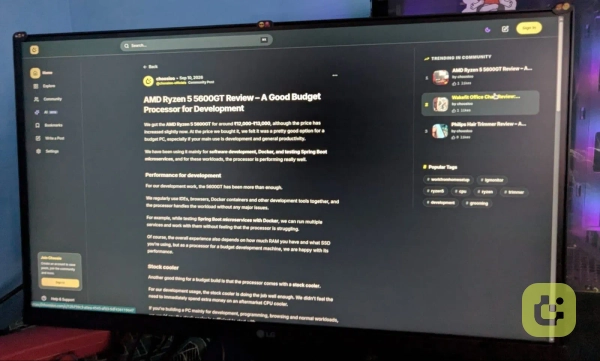
We paired the PC with an LG 22-inch monitor, which cost us around ₹6,200.
For office work and development, we are really happy with this monitor.
The colours are quite vibrant and they pop nicely. The brightness is also more than enough for our regular development and office work.
LG calls it a frameless monitor. We would say it is almost frameless rather than completely frameless, because there are still some bezels. But visually, it looks clean and doesn't feel like a bulky old-style monitor.
The monitor also uses a single-button control system. Initially, it took us some time to understand how the controls work, but once we got used to it, it became quite easy.
For around ₹6,200, we feel it is a good match for this type of budget build.
How does the complete PC perform?
This is where we were actually quite happy with the build.
For our main purpose—development—the PC is performing really well.
We are using it for:
Software development
Docker
Spring Boot development
Testing multiple Spring Boot microservices
Browsing and research
Office work
General multitasking
Budget gaming
For normal development, we don't feel like we're using a "budget PC" most of the time.
The combination of the Ryzen 5 5600GT + 16GB RAM + NVMe SSD gives a good overall experience.
Docker and multiple development tools are also manageable with this configuration.
Obviously, if you're running very heavy workloads, multiple virtual machines and large containers simultaneously, then a more powerful processor and 32GB RAM would make more sense.
But for our current use case, this setup is doing the job very well.
What we like about this build
The biggest advantage of this build is the overall balance.
We didn't put the entire budget into one component. Instead, we tried to make every component useful for the overall system.
The Ryzen 5 5600GT gives us integrated graphics, so we don't have to buy a GPU immediately.
The 16GB RAM is enough for our current development work.
The NVMe SSD keeps the system responsive.
The LG monitor gives us a good display for development and office work.
And because we didn't spend too much on the cabinet and other components, we were able to keep the complete setup around ₹35.8K at the time.
What could be better?
There are obviously some limitations.
The biggest one is the integrated graphics.
For normal usage and budget gaming, it is fine. But for modern demanding games, you will definitely need a dedicated GPU.
The motherboard also doesn't have built-in Wi-Fi in our version, so you'll need an additional adapter if you don't want to use Ethernet.
And 512GB storage is enough to start with, but we would personally prefer 1TB if the budget allows it.
Also, since the component prices have changed, the same configuration may not come under ₹35,800 today.
Is this build worth considering?
For us, yes.
If your main requirement is development, office work, browsing, Docker and general productivity, we feel this is a very practical budget PC configuration.
The nice part is that you don't have to buy everything at the highest specification immediately.
You can start with the integrated graphics and later add a dedicated GPU.
You can also upgrade the RAM and storage later depending on your requirements.
So this can work as a starting point for a budget PC that you can upgrade over time.
Our final take
We built this complete setup for ₹35,800 including the LG 22-inch monitor, based on the prices we paid at the time.
At that price, we feel this was a very good budget build for our requirements.
The Ryzen 5 5600GT has been the highlight for us. For development, Docker and testing Spring Boot microservices, it is performing really well, and the included stock cooler is also enough for our usage.
The integrated graphics are a nice bonus for budget gaming, but don't expect them to replace a dedicated GPU for modern games.
If you're looking for a budget development and office PC that you can upgrade later, this is definitely a configuration we would consider.
Just keep in mind that the prices we mentioned are our actual purchase prices, and the current market price may be higher.